AI Agents Need an Operating Model, Not Just a Better Prompt
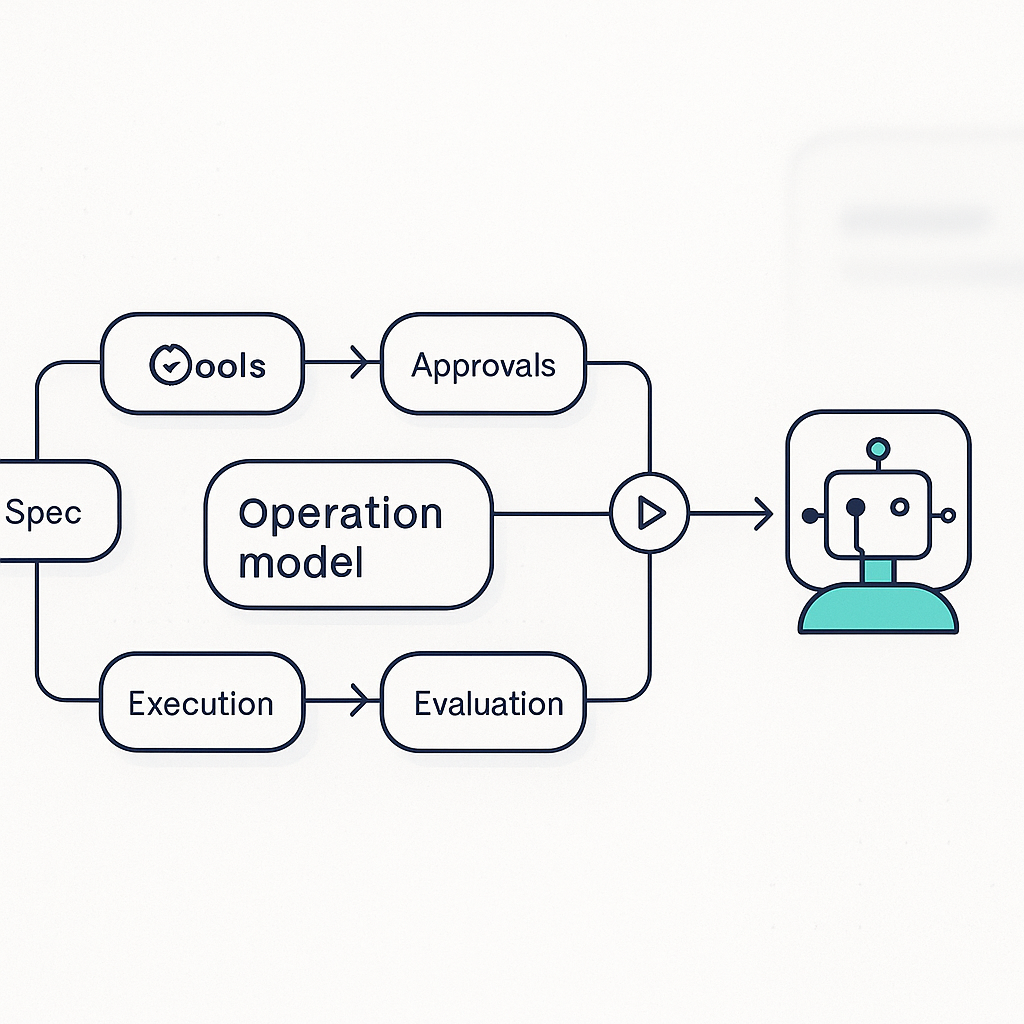
AI agents are improving quickly, but that does not make them self-managing businesses in a box. For most teams, the practical problem is simpler: an agent can only do reliable work when the work around it is clear.
That is why the real advantage usually does not come from the model alone. It comes from the operating model around the model.
If an agent is supposed to answer customer emails, prepare estimates, update CRM records, or move a ticket through a handoff, it needs more than a clever prompt. It needs a defined job, limited tools, approval points, and a way to leave behind work that can be checked later. Without that structure, even a strong model spends too much time guessing what good work looks like.
The operating problem is usually unclear work, not weak AI
A lot of agent projects fail for the same reason process improvement projects fail. The team wants a better outcome, but the underlying workflow is still vague.
If you tell an agent to improve our onboarding flow, you are asking it to decide:
- what problem matters most
- what data to use
- which systems it can touch
- what success looks like
- when to ask for approval
- when to stop
That is too much ambiguity in one instruction.
If you instead give the agent a narrow job with context and constraints, the same model often looks much more capable. For example:
- review new inbound leads from a web form
- classify the lead by service type
- create a draft CRM record
- suggest the next follow-up task
- flag anything missing before a rep contacts the lead
The model did not suddenly become much smarter. The work became easier to interpret.
An operating model has four parts
The pattern showing up across useful agent systems is fairly consistent.
1. Define the job clearly enough to break into steps
The first requirement is a spec that makes the work visible.
That can be a short SOP, a checklist, a routing policy, or a written definition of done. What matters is that the agent is not forced to invent the process from scratch.
Useful specs often include:
- the starting input, such as an email, form submission, call transcript, or ticket
- the expected output, such as a calendar booking, draft estimate, CRM update, or report
- the rules and exceptions
- the success criteria
- the stop conditions
A vague request creates vague execution. A usable spec creates a workflow.
2. Give the agent the right tools, not every tool
The next step is tool access.
This is where teams often make things harder than necessary. They either give the agent no real system access, which makes it perform busywork in text, or they expose too much, which creates unnecessary risk.
Most agent tasks only need a small set of actions.
Examples:
- read a support inbox and draft replies
- pull open invoices from accounting software
- check calendar availability before suggesting times
- update a CRM record after a call summary is approved
- create a follow-up task in a ticketing system
That is a much better setup than broad, undefined access across every system in the business.
The practical question is not whether the agent can use tools. It is whether the tool boundaries match the actual job.
3. Build approvals and verification into the workflow
An agent should not be allowed to quietly compound mistakes.
That is why approval and verification loops matter. These are not extra layers added after the fact. They are part of the product surface of any useful agent workflow.
Examples of sensible checkpoints:
- a sales manager approves an outbound sequence before it is sent
- a dispatcher confirms schedule changes before customers are notified
- a finance lead reviews invoice exceptions before they post
- a support lead checks refund decisions above a threshold
- a human verifies fields before a CRM merge runs
Evaluation matters here too. A workflow should have a way to decide whether an agent run can continue, retry, escalate, or stop.
Without that, teams end up with one of two bad outcomes:
- the agent is so unrestricted that no one trusts it
- the agent is so restricted that it never saves meaningful time
4. Make the work inspectable after the run
Useful systems leave behind structure.
That means the work creates artifacts that can be reviewed and improved later:
- task lists
- logs
- drafts
- decision notes
- updated records
- exception reports
- outcomes tied to the original request
This matters because businesses do not improve from demos. They improve from visible work that can be audited, corrected, and repeated.
If an agent updates calendars, sends drafts, creates estimates, or routes tickets, you need to know what happened and why. That record is what lets a team tighten the SOP, adjust permissions, or fix a bad handoff instead of arguing about whether the model is generally good.
Major AI guidance is moving in the same direction
This shift is showing up in guidance from major AI labs as well.
Anthropic's guidance on building effective agents emphasizes workflows, tool use, and incremental composition rather than abstract autonomy. OpenAI's guidance on agents similarly emphasizes tool boundaries, handoffs, guardrails, and evals. That convergence matters because it suggests the main bottleneck has moved.
The constraint is often no longer raw model capability. It is operational design.
Sources:
What this means for founders and operators
If you are evaluating AI agents for your business, a better question is not Is the model advanced enough?
The better question is Is this work structured enough?
Before you automate anything, check a few basics:
- Can the job be described clearly in one page or less?
- Can the work be broken into observable steps?
- Are the inputs clean enough to use reliably?
- Can tool access be limited to what the task actually needs?
- Is there a review point before customer-facing or financial actions happen?
- Can success be evaluated before the output moves downstream?
- Will the workflow leave behind records your team can inspect?
If the answer to most of those questions is no, changing models will not fix the problem. You will just get faster confusion.
The useful agent products will look more like systems than demos
The strongest agent experiences now follow a practical pattern.
A spec becomes the starting interface. A backlog or task list becomes memory. Approval steps are built into the workflow. Evaluation determines whether a run continues or stops. The prompt still matters, but it is one component inside a larger system.
That is a more durable approach than selling the idea of full autonomy.
Multi-step agent systems can produce finished work across longer time horizons, but only when the environment gives them enough structure to stay aligned with the objective. An agent with no operating model is not truly autonomous. It is under-specified.
That is why teams keep coming back to the same components:
- typed workflows
- constrained tools
- checkpoints
- retries
- audit trails
- handoffs
These are not bureaucratic extras. They are the conditions that make automation usable in real operations.
If you are serious about agents, start by picking one workflow where the inputs, approvals, and outputs are already fairly clear. Map the steps. Limit the tools. Decide where a human reviews the work. Define what a successful run looks like. Then test that system before you ask the model to do anything broader.