AI Needs Action Rails Before It Needs More Autonomy
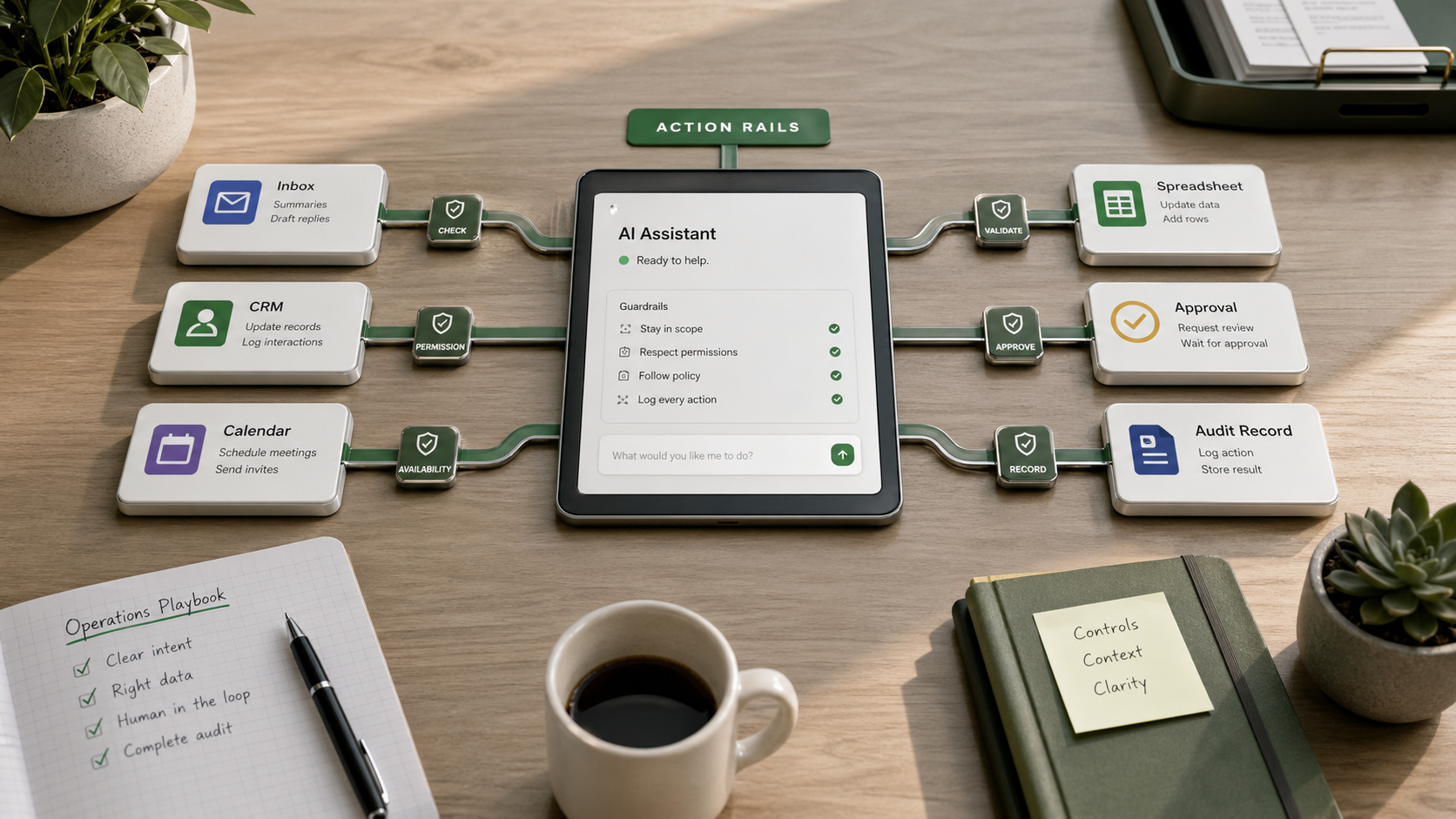
Most businesses do not need a bigger AI demo. They need a safer way to get from a useful answer to a useful action.
That is where many teams stall after early experiments. A model can summarize a meeting, draft an email, review a spreadsheet, or suggest a next step. But the value usually appears one step later, when that output reaches the place where work actually happens: the CRM, shared inbox, calendar, estimate template, project board, ticket queue, billing system, or the person who has to approve the decision.
That bridge is what I mean by action rails.
Action rails are the practical paths that let AI move from advice into controlled execution. They define what the assistant can see, what it can change, which steps need approval, how exceptions get surfaced, and where the record lives after the work is done.
Without those rails, AI stays in a chat window. With them, it can start removing real operating friction without becoming an uncontrolled automation project.
The useful question is not how autonomous the system can become.
The better question is where you can safely let it take the next small step.
Start with the operating problem
A common mistake is to begin with the tool: which AI assistant, agent, or automation platform should we buy?
That puts technology first and workflow second.
A better starting point is a repeated piece of work that already causes delays, rework, or missed follow-up.
Examples:
- A customer asks for a quote, and the team has to dig through old emails, check a spreadsheet, confirm availability, and draft the response by hand.
- A manager finishes a sales call, but the follow-up tasks, notes, and proposal details end up split across a transcript, a notebook, and memory.
- A support inbox contains five kinds of requests, but urgent ones only get noticed after someone reads everything manually.
- A monthly report depends on exports from three systems, but nobody knows whether the inputs are current until someone checks each one.
These are not AI problems. They are workflow problems with clear inputs, decisions, actions, and risks.
That makes them good candidates for action rails.
Map the rails before you add automation
Before you let an AI system take action, write down the path the work should follow.
A simple map should answer five questions.
What can the assistant read?
This might include:
- a shared inbox
- a CRM view
- a folder of past proposals
- call notes
- a spreadsheet export
- website content
- internal SOPs
If a source is old, incomplete, or unreliable, note that. An assistant cannot make sound recommendations from bad records.
What can it produce?
Be specific.
- A draft email is different from a sent email.
- A suggested task is different from a task assigned to a team member.
- A flagged invoice is different from an edited invoice.
- A recommended schedule change is different from a calendar update.
Vague scope creates avoidable risk.
What can it change without approval?
For most small and mid-sized businesses, the answer should be less than you think at first.
Good early permissions often include:
- labeling
n- summarizing
- extracting details into a CRM record
- preparing drafts
- comparing records
- flagging exceptions
Higher-risk actions usually need review first:
- sending customer messages
- changing pricing
- issuing refunds
- moving meetings
- deleting records
- ordering inventory
- publishing anything external
Where does human review happen?
Approval should be part of the workflow, not an extra step someone remembers later.
The reviewer should be able to see:
- the source material
- the proposed action
- the reason for the recommendation
- the easiest way to approve, edit, or reject it
If review lives in a separate inbox, a hidden tab, or a tool no one checks, the process will break.
What record is kept?
When a customer asks why something happened, or a manager wants to improve the process, the team needs a trail.
That trail should show:
- what the assistant read
- what it suggested
- who approved or changed it
- what happened next
That is the difference between a clever demo and a business process someone can trust.
The first useful rail is often a draft
Many teams move too quickly from AI can help to AI should handle this automatically.
Usually, the first useful rail is a draft.
Examples:
- a draft quote response
- a draft task list after a meeting
- a draft weekly summary of customer issues
- a draft vendor follow-up
- a draft report that shows missing inputs before anyone spends time polishing it
Drafts matter because they shorten the distance between information and action while keeping judgment with the person who owns the outcome.
They also expose where the workflow is actually weak.
You may learn that:
- the source documents are inconsistent
- the approval rule is unclear
- customer tiers are not defined
- estimate templates vary too much by rep
- the real bottleneck is deciding, not writing
You learn that faster when the assistant is connected to real work but still bounded.
Permissions are really business rules
Action rails are not only technical. They are a way to make business context visible.
A system that can read everything creates different risk than one limited to a single folder, customer segment, or ticket type. A tool that can draft a refund note creates less risk than one that can issue the refund. A scheduling assistant that proposes times is not the same as one that moves other people's meetings.
Small businesses often run on informal rules.
Someone knows:
- which customer account needs extra care
- which vendor has been unreliable
- which discounts require owner review
- which requests should be routed to HR, legal, or finance
If those rules only live in someone's head, an AI system cannot follow them consistently.
That does not mean the business is not ready. It means the first implementation work may be turning informal judgment into usable operating rules.
For example:
- Always ask for approval before sending anything to a customer.
- Never change pricing without manager review.
- Only summarize financial documents; do not create payment instructions.
- Flag legal, medical, HR, or compliance-sensitive requests instead of answering them directly.
- Show source links or excerpts for any recommendation that changes customer-facing work.
These are simple rules. They make the system more useful because they make the boundary clear.
Good implementation looks like a reliable handoff
The best early AI workflows are often quiet.
They do not replace a department. They reduce the repeated searching, copying, sorting, and first-draft work that slows people down.
A solid handoff might look like this:
- The assistant reviews yesterday's customer messages.
- It groups them by issue, flags urgent ones, drafts suggested replies, and creates a review queue.
- The owner or team lead opens the queue, edits three replies, rejects one, and approves the rest.
- The system records what was approved and what changed so the workflow can be improved later.
That is not full autonomy. It is controlled assistance.
For most businesses, that is a better first target.
Where to start this week
Pick one workflow where the answer alone is not enough and the next step matters.
Then write a one-page action rail map:
- What does the assistant read?
- What does it produce?
- What can it change?
- What requires approval?
- Where is the record kept?
If you cannot answer those questions yet, buying another AI tool will probably add noise.
If you can answer them, even a small assistant can become practical fast.
The businesses that get value from AI will not be the ones chasing the most autonomy first. They will be the ones that build clear rails around calls, inboxes, estimates, tickets, reports, and approvals so useful work can move forward without creating new messes.
Start there, and your next implementation decision will be easier to make.