When a Repeatable Workflow Should Become a Skill and Automation
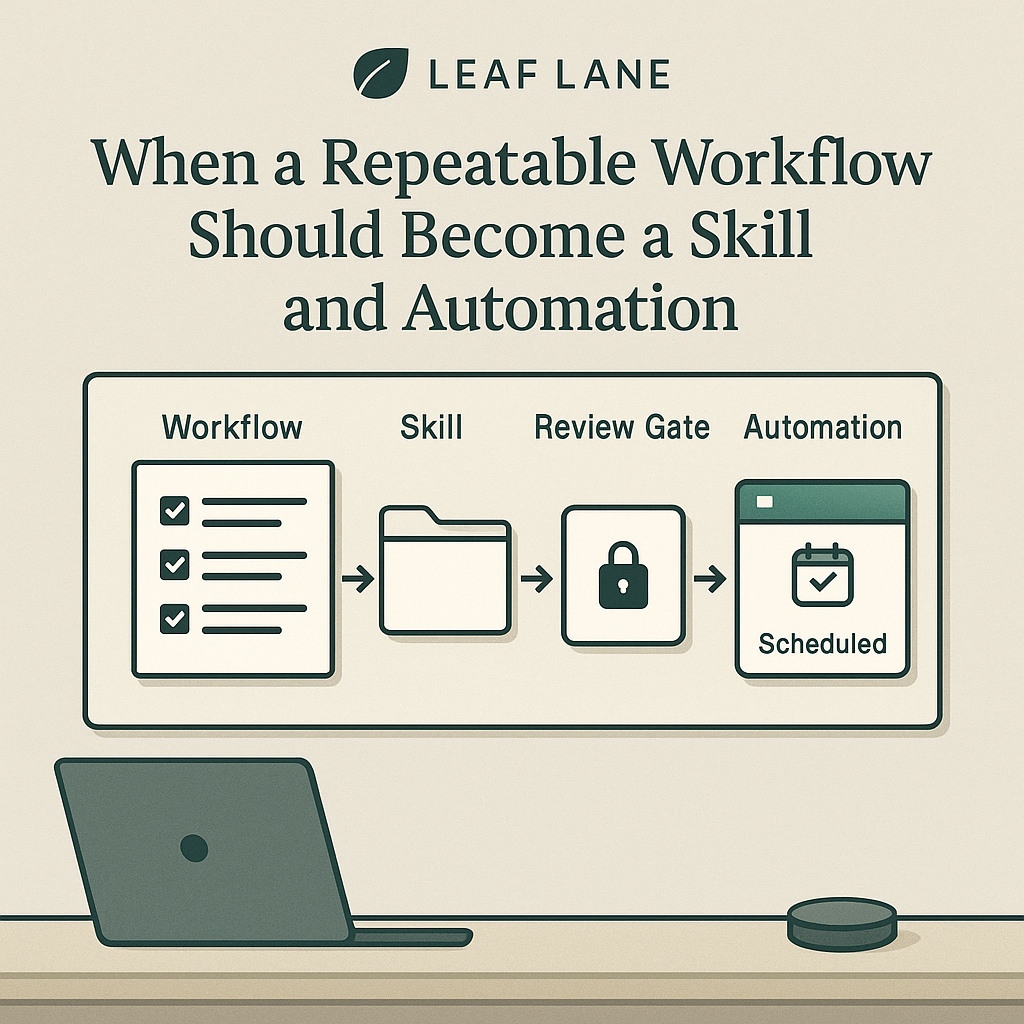
Most businesses do not need more one-off AI experiments. They need the few useful ones to stop depending on memory.
That is usually where the drop-off happens. Someone uses Codex to clean up a report, review a folder of client notes, triage an inbox, test a checkout flow, or draft a follow-up plan. It works. It saves time. Then nobody turns that successful run into a repeatable operating process.
The real question is not whether AI can help with a task. The better operating question is: if this worked once, what would make it reliable enough to use again next week without starting from scratch?
That is where the progression from prompt, to workflow, to skill, to automation becomes useful.
Start with the work that already succeeded
A reusable skill should not begin as a clever instruction. It should begin with a real completed workflow.
Say a professional services firm runs a weekly client health check. The first pass might happen in a normal Codex session:
- inspect the client tracker spreadsheet
- review recent client emails
- find accounts with no touch in 14 days
- identify overdue deliverables
- draft follow-up tasks for a manager to review
If that output helps, save more than the final answer. Save the operating details that made the answer useful:
- Which files, apps, or records were inspected
- What counted as a risk
- Which signals mattered most
- Which signals were too noisy to use
- What the reviewer corrected, approved, or rejected
- What output format made action easy
Those details are what separate check client health from a workflow a team can reuse.
A skill is a packaged workflow, not a magic prompt
OpenAI describes Codex skills as task-specific packages that can include instructions, resources, and optional scripts so Codex can follow a workflow reliably: https://developers.openai.com/codex/skills
For an operating team, that means a skill is closer to a lightweight SOP than a one-line prompt.
OpenAI also lists Codex use cases that fit this pattern, including analyzing datasets and reports, managing inbox work, querying tabular data, QA with Computer Use, and saving repeatable workflows as skills: https://developers.openai.com/codex/use-cases
A useful client health check skill might include:
- Trigger conditions: every Monday morning or before a client success meeting
- Required sources: the client tracker, recent emails, open project notes, overdue task list, and account-risk rules
- Ordered steps: inspect the tracker first, then email, then deliverables, then summarize exceptions
- Definitions: what counts as no recent touch, overdue, blocked, waiting on client, or needs manager review
- Output format: a short list of accounts needing action, with owner, reason, evidence, and suggested next step
- Safety rules: do not send emails, change CRM records, or mark tasks complete without approval
- Review checklist: require a person to approve outbound messages, client-status changes, or escalations
The point is not to remove judgment. The point is to preserve the parts of the workflow that should not change based on who happens to be running it.
Decide separately whether it should run on a schedule
Automation is a different decision.
OpenAI's Codex app documentation says recurring tasks can run in the background, add findings to the inbox, and combine with skills for more complex work: https://developers.openai.com/codex/app/automations
That does not mean every useful skill should become a scheduled automation.
A workflow is a stronger automation candidate when:
- the trigger is predictable
- the source data is available on time
- the output can wait for review
- a false positive is annoying, not expensive or relationship-damaging
The weekly client health check fits well. It can run in the background and only report exceptions. If three accounts need attention, a manager reviews the evidence and decides the next move. If nothing needs attention, the team gets a quiet confirmation and keeps working.
A workflow is a weaker automation candidate when it depends on:
- live negotiation
- sensitive judgment
- missing or scattered context
- immediate external action
In those cases, a skill can still be useful. A person can run it when needed, keep the steps consistent, and handle timing themselves.
Write the approval gates into the workflow
The important control is not the schedule. It is the approval gate.
A skill can gather evidence, compare records, draft recommendations, and format a review. An automation can run that same process every week. But a team still needs to be explicit about where a human must step in.
Useful approval gates often sit before actions like:
- contacting a customer
- changing prices, invoices, refunds, or payment status
- updating legal, HR, finance, or compliance records
- deleting, archiving, or overwriting source data
- escalating a relationship-sensitive issue
- publishing anything public
Write those boundaries into the skill itself. Then if the process is automated later, the same limits carry forward.
That is how you get repeatability without handing over every decision.
Aim for boring inputs and boring outputs
A mature workflow usually has plain, specific inputs and outputs. That is a good sign.
For the client health check, the inputs might be:
- a spreadsheet export of active clients
- a folder of meeting notes
- recent email threads from the last 14 days
- a list of open deliverables
- a short note defining risk signals
The outputs might be:
- a manager-ready exception report
- a list of accounts with no recent touch
- overdue deliverables with supporting evidence
- draft follow-up tasks, not assigned tasks
- draft email language, not sent messages
- a short
nothing to reportnote when no action is needed
That last one matters. A useful automation should not create noise just because it ran. Sometimes the best output is confirmation that no review is needed.
Keep the first version narrow
The common mistake is trying to automate a whole department.
A better move is to package one narrow workflow that already happens on a rhythm.
Good candidates include:
- weekly client health review
- monthly reporting check
- new lead triage
- end-of-day handoff
- content publishing checklist
- invoice exception review
- customer feedback routing
- lightweight QA on key site flows
Run it manually with Codex a few times first. Tighten the instructions. Add missing definitions. Watch where the reviewer keeps making corrections.
Those corrections matter. If the same issue shows up every run, the workflow is not fully defined yet. Fix that before you try to automate anything.
Use a simple rule before you package it
A workflow is usually ready to become a skill when three conditions are true:
- The task has happened enough times that the steps are no longer guesswork
- The output has a stable shape, such as a report, checklist, task list, draft, exception log, or decision brief
- The risk boundaries are clear enough that Codex knows what it may inspect, what it may produce, and what must stay with a person
A workflow is ready to become an automation only when:
- the timing is predictable
- the inputs show up reliably
- the output can be reviewed before action is taken
That progression is practical because it keeps the work grounded.
- First, prove the workflow once.
- Then document the pattern.
- Then package it as a skill.
- Automate only the parts stable enough to run quietly in the background.
A good prompt can save an hour once. A documented workflow can save it again next week. A skill can make the work easier for someone else on the team to run. An automation can place the review in the right inbox or queue without relying on someone to remember it.
If you want to test whether a workflow should move forward, do one simple check: pull the last successful run, list the exact inputs, list the exact approvals, and see whether another team member could repeat it from those notes. If they cannot, it is still a one-off. If they can, you are close to something worth packaging.